Trending Insights

The Digital SAT for August 2026 is happening this Saturday, August 22, 2026, and if you have a seat booked, you are now officially in test week. Registration for this sitting closed on August 7, with the late registration and changes window closing on August 11, so at this point the exam is locked in and your job shifts from prep to logistics.
This final week checklist walks you through exactly what to finish in Bluebook before test day, what to pack for the test center, what to leave at home, and how to structure the hours before and during the exam so nothing catches you off guard on August 22.
Registration Is Closed, Exam Setup Is Open
Regular and late registration for the August 22 SAT has already closed, so your focus now shifts entirely to Bluebook exam setup. College Board opens this setup window in the days immediately before test day, and for the August 22 sitting it runs from August 17 to August 21, 2026. Completing exam setup is what generates your admission ticket, and you cannot enter the test center without it.
Scores Are Scheduled for September 4
College Board has scheduled score release for the August 22 sitting on Friday, September 4, 2026. Scores are typically posted from around 8 AM Eastern Time, which is evening in the UAE, so plan to check that night rather than first thing in the morning Dubai time.
If You Miss This Sitting
The next scheduled Digital SAT after August 22 is Saturday, September 12, 2026. If today’s checklist reveals a setup issue you cannot resolve in time, or you simply want a second attempt, that date gives you another option without a long wait.
If you have not opened Bluebook yet this week, this is the single most time sensitive item on your list. Exam setup is separate from downloading the app, and skipping it means you show up without a valid admission ticket.
Do this today if you have not already, since the setup window for August 22 closes on August 21, leaving no buffer for last minute technical issues.
Book a free consultation with our SAT tutors for a quick review of your weak areas, a Bluebook setup check, and last minute strategy tailored to your test day.
A Fully Charged Testing Device
Your device must meet College Board’s requirements for the Digital SAT: a Windows 10 or later laptop, a Mac running macOS 12 or later, a ChromeOS device, or an iPad running iPadOS 16 or later with Bluebook installed. Smartphones are not permitted as testing devices under any circumstances. Charge your device fully the night before, and if it cannot reliably hold a charge for three hours, bring a charging cable or power bank as a backup rather than a second device.
Your Printed or Saved Admission Ticket
Bring the admission ticket generated during Bluebook exam setup. A printed copy is the safest option, though saving it to your email as a backup is a good habit in case anything happens to the printout on the way to the center.
A Valid Physical Photo ID
Your photo ID must be an original physical document, not a photo or screenshot on your phone, and the name on it must match the name on your admission ticket exactly. Check this several days ahead rather than at the door, since a name mismatch is one of the most common and avoidable reasons students are turned away.
Pencils or Pens for Scratch Work
The Digital SAT does not use a paper answer sheet, but test centers provide scratch paper and you will want something to write with. Most centers supply pencils, but bring at least two sharpened No. 2 pencils of your own as backup, along with a good eraser.
An Approved Calculator, as an Optional Backup
Bluebook includes a built-in Desmos graphing calculator available on every math question, so you do not technically need to bring your own. If you are more comfortable with a physical calculator, you may bring an approved graphing or scientific calculator as a backup for the Math section only.
A Small Snack and Water for the Break
There is one ten minute break between the Reading and Writing section and the Math section. Pack a light, low sugar snack such as nuts, a granola bar, or a banana, along with water. Keep both in your bag under your seat, since nothing except your device, charger, and writing tools is allowed on the desk itself.
College Board enforces these rules strictly, and bringing a prohibited item can mean dismissal from the test or cancellation of your score, so it is worth double checking your bag the night before.
Before You Leave Home
Set a primary alarm that gives you enough time to eat breakfast, travel, and arrive around thirty minutes before your reporting time, then set a backup alarm ten minutes later. A missed alarm is one of the most common reasons students arrive late. Lay out your device, ticket, ID, pencils, and snack the night before so the morning is calm rather than rushed.
At the Test Center
Test centers typically follow a standard sample schedule with doors opening around 7:45 AM and closing around 8 AM, but your own admission ticket may list a different reporting time, so follow that rather than a general rule. After check-in, staff will verify your ID and ticket before you are seated and guided through final device setup on screen.
During the Exam
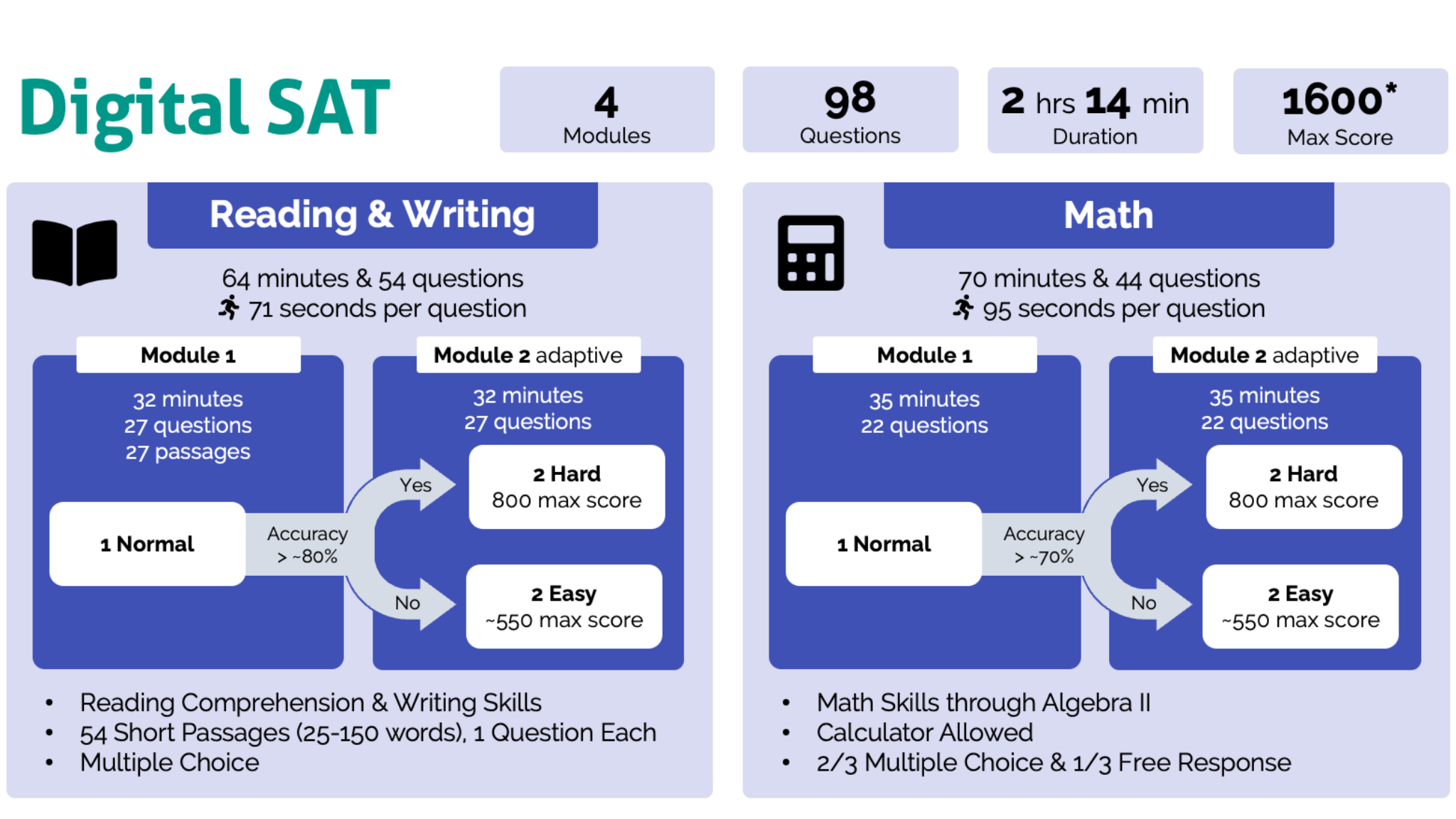
The Digital SAT itself runs two hours and fourteen minutes of actual testing time, split into a Reading and Writing module and a Math module, with one ten minute break in between. Plan for about three hours total at the center once check-in and setup are included. Phones stay away for the entire visit, including during the break, since accessing one at any point can result in your score being cancelled.
Most of what determines how August 22 goes for you has already been decided by the months of preparation behind you. What is still within your control this week is Bluebook exam setup, a packed bag with the right items, and a calm, well timed morning. Handle those three things and you walk into the test center with nothing left to worry about except the questions in front of you.
If you want a final review of your weak areas or a quick check on your Bluebook setup before Saturday, visit Vegavisionary.com or message us directly on WhatsApp and our team will help you get ready.
Written by the Vega Visionary Team
Always follow the reporting time printed on your own admission ticket rather than a general rule, since it can vary by center. College Board’s standard sample schedule has doors opening around 7:45 AM and closing around 8 AM, so arriving at least thirty minutes before your listed time is a safe buffer.
Complete it as soon as possible, since the setup window for August 22 closes on August 21, 2026. Exam setup is what generates your admission ticket, and without that ticket you will not be able to enter the test center on test day.
You do not need to, since Bluebook has a built in Desmos graphing calculator available on every Math question. You may bring an approved physical calculator as an optional backup, but it is not required.
No, College Board requires an original physical photo ID that shows the same full legal name as your admission ticket. A digital copy or screenshot on your phone is not accepted, so check your ID situation several days before test day rather than at the door.
No, phones must stay silenced and stored away for the entire time you are at the test center, including during the break. Accessing your phone at any point after check-in can lead to your score being cancelled, so leave it in your bag the whole time.
You may only use the single device you set up in Bluebook, so a spare laptop or tablet is not a reliable backup plan. A better precaution is making sure your device is fully charged and bringing a charger or power bank in case you need it.
College Board has scheduled score release for the August 22 sitting on Friday, September 4, 2026, generally from around 8 AM Eastern Time, which falls in the evening in the UAE.
The next scheduled Digital SAT sitting after August 22 is Saturday, September 12, 2026. Registration deadlines for that date typically fall a few weeks earlier, so it is worth confirming the exact cutoff on College Board’s site if you are planning around it.